Event Stream Profile
InstaSafe ZTNA supports integration with external SIEM products. This feature is exclusively used for streaming/sharing system events to customer for their SIEM integration/Analysis.
Event streaming is for sending system events to an external system. Email alerts to administrators are configured separately, on risk profiles, and reports can be emailed on a schedule through report subscriptions - both are covered in Email Alerts and Scheduled Reports.
Creating Event Stream Profile
The administrator can configure how they should receive InstaSafe ZTNA system events in their infrastructure from Event Stream Profile tab in configuration section of the dashboard.
-
The admin can fill the details of the configuraton in the UI.
-
Event can be streamed in two format i.e. Syslog and FTP/SFTP.
For Configuration in Syslog format.
 Syslog Server Type- UDP/TCP
 Syslog SSL Enabled- True/False
 Syslog Facility (KERN/USER/MAIL/DEAMON/AUTH/SYSLOG/LPR/NEWS/CRON/
 UUCP/AUTHPRIV/FTP/NTP/AUDIT/ALERT/CLOCK).
 This data can be obtained from syslog server documentation.
 Syslog Server (ip/dns name)
 Syslog Server Port
 Syslog Message Format (RFC_3164/RFC_5424/RFC_5425)
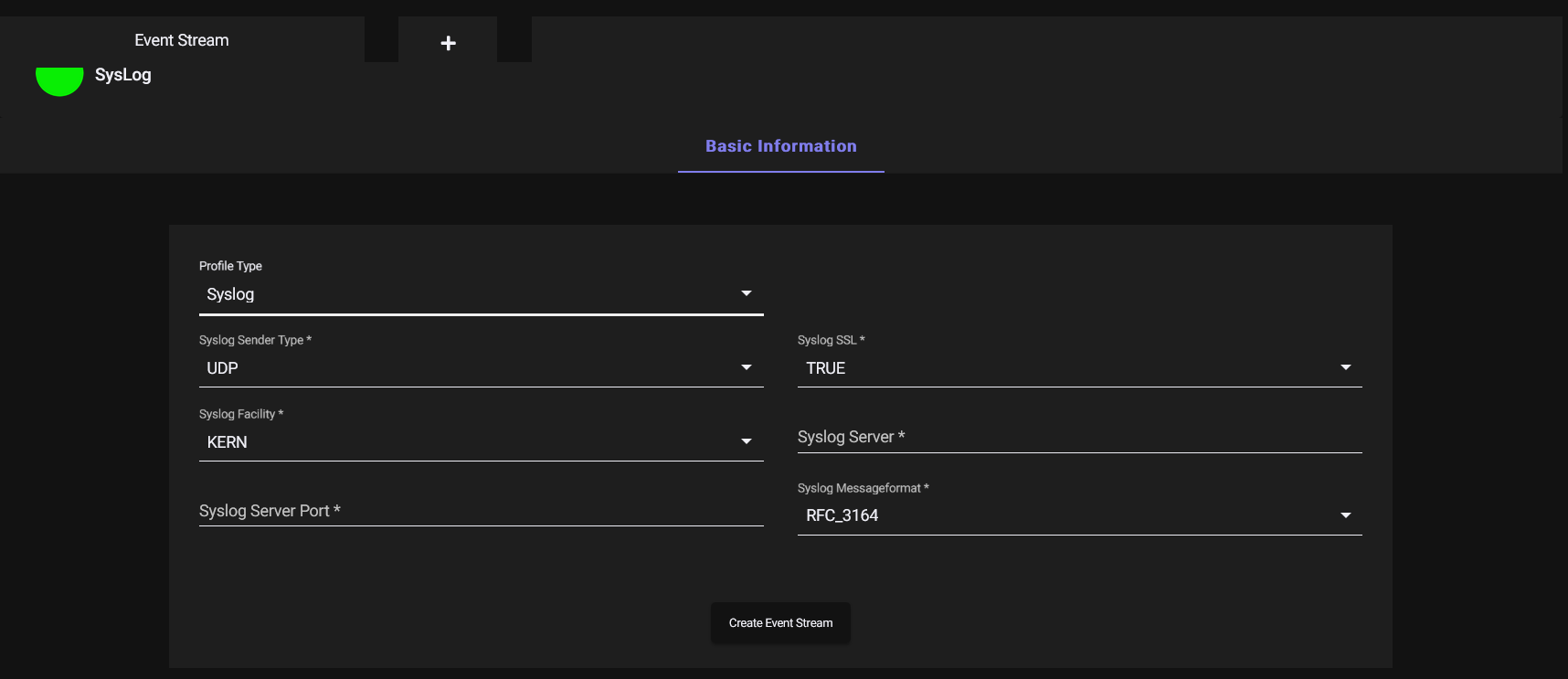
For Configuration in FTP/SFTP format
Buffer Delay (how many minutes system events needs to buffered in ESS client and uploaded to FTP/FTPS/SFTP server)
FTP Hostname
FTP Port
FTP Username
FTP Password
FTP Directory
Protocol (FTP/FTPS/SFTP)
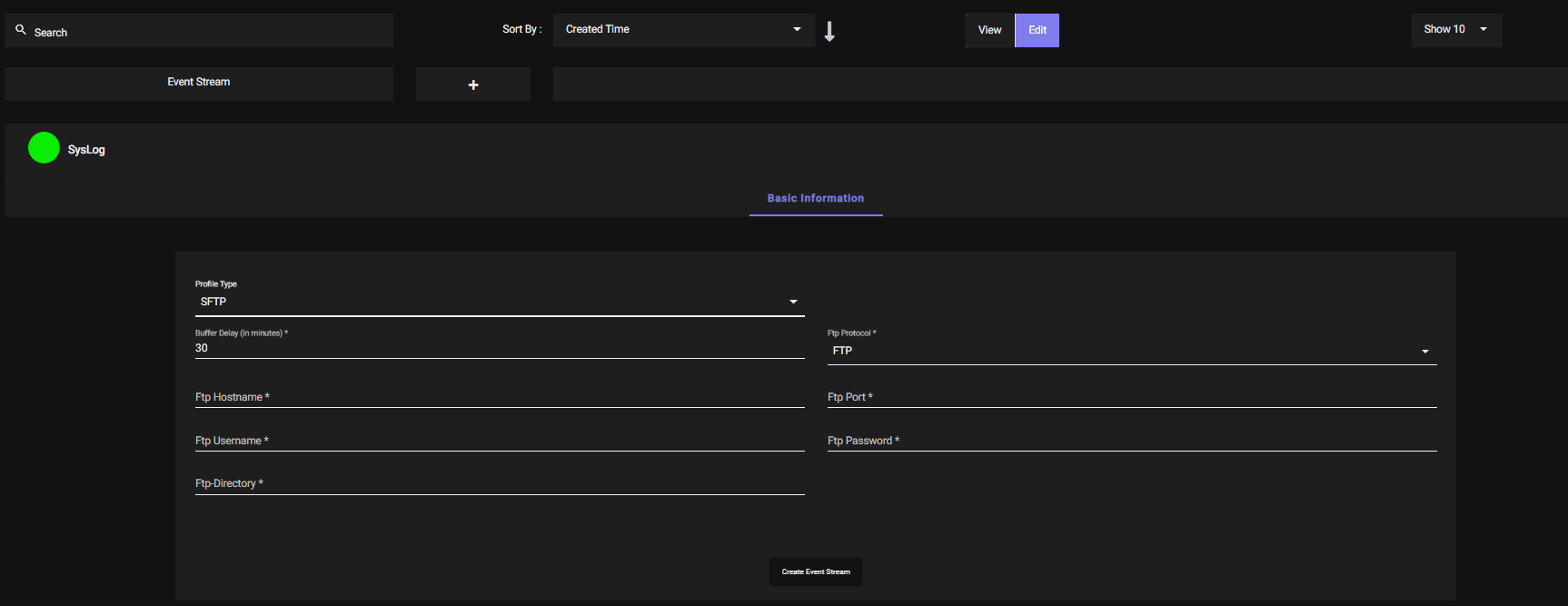
- Once the given data is configured click on Create Event Stream Button and the Event stream profile will be created.
Real-time streaming, and what the Buffer Delay applies to
Buffer Delay applies only to the FTP, FTPS and SFTP file-delivery path. It exists because a file has to be closed before it can be transferred. It has no effect on syslog output.
Events streamed over syslog leave the platform as they are generated, with no buffering interval, in a selectable RFC format - RFC 3164, RFC 5424 or RFC 5425 - over UDP or TCP with optional SSL. Any syslog collector receives them, including syslog-ng and rsyslog, with no collector-specific integration required. See Real-Time Log Streaming to External Systems.
Email alerts on security and user events
Events can also raise an email to the administrator the moment they happen, through a risk profile whose action is Email Admin - failed sign-ins, failed second factors, failed device checks, a device not bound to the user, access from an unexpected location, a changed browser or platform, or use of a dormant account. Scheduled reports are delivered the same way on a daily, weekly or monthly cycle. See Email Alerts and Scheduled Reports.
Integration with other systems
Logs reach a SIEM, log parser or monitoring platform through the syslog interface described above, in standard RFC formats. Where a specific platform requires an API integration, that is undertaken as part of the integration work for the deployment.