Certificate-Based Authentication
A digital certificate can be used to authenticate a user, either on its own or alongside a password. It is configured in two places, depending on what the certificate is doing.
As a passwordless authentication method
A Passwordless profile sets what a user presents instead of a password, and what they fall back to if that is unavailable:
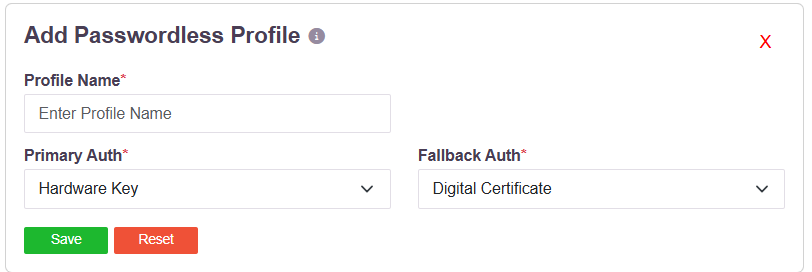
| Setting | Options |
|---|---|
| Primary Auth | Digital Certificate, Hardware Key, Kerberos |
| Fallback Auth | Digital Certificate, Hardware Key, Password |
Digital Certificate and Hardware Key are different mechanisms and are offered separately. A hardware key is a FIDO2 authenticator - a security key or a platform authenticator - which proves possession through the WebAuthn protocol and holds no X.509 certificate. A digital certificate is an X.509 certificate presented by the client and validated by the platform.
A profile can combine them: a certificate as the primary method with a hardware key as the fallback, or the reverse.
Alongside a directory
An Active Directory or OpenLDAP profile carries an Authentication Type:
| Option | What the user presents |
|---|---|
| Certificate | The certificate alone |
| Password + Certs | The directory password and the certificate |
Password + Certs makes the certificate a second factor on top of the directory credential, rather than a replacement for it. See Directory Queries and the Login Identifier.
Where the certificate lives
The platform consumes a client certificate; it does not issue one. Certificates are issued by the organisation's own certification authority and installed on the user's machine, where the client presents them from the operating system's certificate store.
That store holds both software-resident certificates and certificates whose private key is held on a hardware device, so either kind is presented to the platform the same way. Where the key is on a hardware device, the device's own PIN or unlock gates its use, and the key never leaves it.
Related
For FIDO2 and WebAuthn as a second factor, including security keys and platform authenticators, see WebAuthn MFA. For the full set of second factors, see Configure MFA.